• Home
  • |
  • Main Gallery
  • |
  • About Matt
  • |
  • My Blog
  • |
  • Shopping
  • |
  • Photo Day Courses
  • |
  • Private Tuition
  • |
  • Tutorials
  • |
  • Services
  • |
  • Framing
  • |
  • Contact Us
About Matt Order & Delivery Info Customer Comments Fun and Free
Books Posters Greeting Cards Postcard Packs Gift Certificates Buy it now framed photos
Commercial Photography Professional Film Scanning Australian Stock Images
Course Index Northern Beaches Weekend Day Courses Eastern Beaches Weekend Day Courses Sydney City Weekend Day Courses Newcastle Weekend Day Courses One on One Day Courses Blue Mountains Weekend Day Course Blue Mountains Full Weekend Feedback / comments from past courses
WHATS NEW // - NEW IMAGES ADDED TO THE GALLERY 23rd JULY 09 • NEW PHOTOSHOP TUTORIAL ADDED - FORRESTERS BEACH •

When I first set out to put together a group of tutorials I had a look around to see what was on the internet and there are a lot of tips and tricks out there but I found nothing of any real substance or the images used were so terrible you couldn't tell if the technique made the image better or worse.

My tutorials use my own images and are all recorded in high resolution with clear audio so following along is a breeze. The tutorials range from retouching techniques, tips and tricks to complete work flows from RAW image processing through Camera RAW into Photoshop for final editing and touches ready for printing.


On my photographic courses I always emphasis the importance to students to embrace a digital workflow to take advantage of RAW image capture and the techniques taught. These tutorials have been designed to make your digital images reach their potential.

  • Visit main info pageComplete Collection| All the tutorials
    All the tutorials listed below are available to purchase as one complete item.
    Buy the complete collection and recieve free downloads of new tutorials added for 12 months.

  • Visit main info pageNEW - Skillion Storm Brewing | Central Coast, NSW
    This tutorial features my new tutorial layout. Recorded in HD 1280 x 720. We discuss the concept of exposure bracketing and the capture technique and then blend in four images to create the final high resolution master print file.

    We look at the process of duplicating masks to replace different water scenes, clipping masks to adjust and fine tune each layer separately and then colour tone the image.

  • Visit main info pageForresters Beach | Central Coast, NSW
    My first tutorial introducing the technique of exposure blending. In this tutorial I show you the full production my forresters beach image from blending in three images taken at different brightness exposures to create one perfect exposure.

    The image is then developed and processed in photoshop to enchance detail, control highlights, bring out the colour and create the overall mood.

  • Visit main info pageBrisbane Waters | Central Coast, NSW
    The tutorial will show the method to open your Canon 5D Mark II RAW files in CS3 Camera RAW 4.5 and then the full production of the shots that made this panoramic from Camera RAW processing to stitching with PTGui and then development in Photoshop. Nothing is missed out.

  • Visit main info pageThe Entrance | Central Coast, NSW
    A 7 image panoramic stitch where the images are processed through Camera RAW into Photoshop for joining using photomerge and final editing in photoshop.

  • Visit main info pageSoldiers Beach | Central Coast, NSW
    Five images captured on my Canon 1ds Mark II shot at 24mm makes up this 150 degree view of Soldiers Beach. The sequence of images that made up this panoramic were captured just before dawn where the horizon was covered with low cloud behind me.

  • Visit main info pageObservatory Hill | Sydney, NSW
    This tutorial is the development of a single image digital photo. The image is processed in Camera RAW then opened into Photoshop were the bulk of the images effect and look is created.

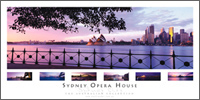
  • Visit main info pageSydney Opera House | Sydney, NSW
    Black and White photographs are always popular. This tutorial covers the creative cropping of a digital panoramic image and then it's development in photoshop into enhance the detail on the Opera House sails while creating the perfect B&W effect.

  • Visit main info pageTotal Retouching Package | Group Download
    This package includes all the Retouching Technique tutorials in a single download at a discounted price.

  • Visit main info pageDuotone | Retouching Technique
    This tutorial looks at converting the image to B&W and then adding a Duotone correctly and then finished off with some additional photoshop post production to enhance effect.

  • Visit main info pageVelvia Pop | Retouching Technique
    With digital images a complaint you hear quite often is that the image lacks colour and is lifeless. If only you could get the colour you could get the saturated colour that slide film offers. Well you can and you wont have to sacrifice image quality or banding. It's called Velvia Pop.

  • Blue Mountains Weekend CourseNon destructive Dodge & Burn | Retouching Technique
    Forget about Photoshops Dodge and Burn tools. This technique puts the creative power back in your hands with full control on painting the effect on your images and also giving you a simple option to correcting any mistakes.

  • Visit main info pageBlack and White Point | Retouching Technique
    Simple but very effective on the right shot. I show you how to set the white and black point in this image and you will see first hand how it transforms this image.

  • Visit main info pageLocal Area Contrast | Retouching Technique
    This technique is one of those tricks that when you see it applied to your shot you will without meaning to say out loud "Wow". A must for any photographer.

  • Visit main info pageHigh Pass Sharpen | Retouching Technique
    Photoshop is shipped with several filters that will sharpen your image according to your needs. This tutorial shows a different technique used to sharpen the image with the High Pass Filter to not only add sharpness but also to add a hint of clarity as well.

  • Visit main info pageLAB Colour and Brightening | Retouching Technique
    In photoshop there are many ways to skin a cat. This is my favorite way to add clean colour to an image while you also correct any colour cast in the process and while we are there we will also be adjusting the highlights and shadow to our taste.

  • Visit main info pageApply Image | Retouching Technique
    A feature of photoshop tucked away in the main menu. In this tutorial you will see it used in creating the main look of this photo, followed by some additional post production to finish it off.

  • Visit main info pageDynamic Shadow Trick | Retouching Technique
    In this tutorial we look at creating depth and feeling to a shot that is under the canopy. This technique works best on shots that are of waterfalls or in rain forests where there is smooth contrast between shadow and highlight.

  • Visit main info pageClipping Highlights | Retouching Technique
    Keeping an eye on your highlights when editing an image is critical to making sure your image retains it's quality. In this tutorial I'll show you how this is done with great accuracy not only so you can monitor the brightness but also watch channels from blowing in both Photoshop and in Camera RAW.

  • Visit main info pageShadow Highlight | Retouching Technique
    The shadow highlight adjustment in photoshop is one that is unused by allot of photographers and when it is used, it is usually applied in correctly. This tutorial shows you a great default set up of the feature and how to apply it to your image.

  • Visit main info pageLayer Masks | Retouching Technique
    An introduction to layer masks and their application to blending to two photo's together. Gives you a look at painting on masks, using the gradient tool and loading masks in so they can be used with other photoshop tools.

  • Visit main info pageImage Borders | Tips and Tricks
    A tutorial showing you how to create a smart and clean boarder around your image that will set it apart from the rest when you upload it to a web site / blog or emailing to friends.

  • Visit main info pageHelpful Websites | Tips and Tricks
    This tutorial looks at the web sites I use on a daily basis for location research, long range weather predictions and sites where you can resource information and upload your work to the friendly community of other photographers.

  • Visit main info pageSetting up for Professional Printing | Tips and Tricks
    In this tutorial we look at setting up printing files for two different labs to maximize cost and minimize expense by submitting print ready files for the lab.

  • Visit main info pagePhotoshop Actions | Tips and Tricks
    Understanding and creating custom photoshop actions are worth their weight in gold. Streamline your workflow and images in the simple push of a button with the photoshop action I show you to create.

  • Visit main info pageBlowing the Red Channel | Tips and Tricks
    This tutorial looks and discusses remedies to prevent the blowing of the red channel. I talk about a Camera RAW / Photoshop solution to salvaging what you can from the images where this has happened.

  • Visit main info pageMy Equipment | Tips and Tricks
    I'm asked quite often by photographers of all levels regarding what equipment I use in my every day shooting. Finding the right equipment has taken a lot of trial and error on my behalf and this video walks you through all the items I have including order codes making it ever so easy for you to order the same.

  • Visit main info pageCreative Cropping | Tips and Tricks
    When shooting digital panoramic's you have to picture what the shot is going to look like once it has been stitched and cropped in photoshop. This tutorial talks about and looks at how to view digital panoramic's and capture them.

  • Visit main info pageNEW - Cropping to the right ratio| Tips and Tricks
    Cropping correctly is an important aspect of your workflow as you want to maximize your images composition and file size. You also need to put thought into what ratio you are going to make your image image as well and this tutorial walks you through the thought process behind this and how to crop perfectly.

  • Visit main info pageNEW - sRGB and web ready images | Tips and Tricks
    Making sure your images look their best on line is essential to not only customers but also to yourself and the community of people who will look and comment on it. This tutorial guides you through my process of preparing my images for on line viewing.

 
  • Masterclass Tutorials
  • Photoshop Masterclass - The Entrance, Central Coast, NSW
    view tutorial
  • Photoshop Masterclass - Soldiers Beach, Central Coast, NSW
    view tutorial
  • Photoshop Masterclass - Observatory Hill, Sydney, NSW
    view tutorial
  • Photoshop Masterclass - Sydney Opera House, Sydney, NSW
    view tutorial
  • Photoshop Masterclass - Brisbane Waters, Central Coast, NSW
    view tutorial

  • Retouching Techniques

    Non Destructive Dodge and Burn
    view tutorial
  • Setting Black & White point
    view tutorial
  • LAB Colour and Brightening
    view tutorial
  • Duotone
    view tutorial
  • Velvia Pop
    view tutorial
  • Clipping Highlights
    view tutorial
  • Shadow Highlight
    view tutorial
  • Local Area Contrast
    view tutorial
  • High Pass Sharpening
    view tutorial
  • Using Apply Image
    view tutorial
  • Layer Masks
    view tutorial
  • Dynamic Shadow Trick
    view tutorial
  • Tips and Tricks of the trade
  • Creative Cropping
    view tutorial
  • Image Borders
    view tutorial
  • Setting up for professional printingview tutorial
  • Blowing the red channel
    view tutorial
  • Helpful websites
    view tutorial
  • My equipment set up
    view tutorial
  • Photoshop Actions
    view tutorial
 
  • Services
  • Commercial Photography
  • Professional Film Scanning
  • Photographic Courses
  • Postage Rates
  • Merchandise
  • Photoshop Tutorials
  • Books
  • Postcards
  • Greeting Cards
  • Posters
  • Retailers
  • Where to buy my work
  • How to stock my work
  • Legal
  • Image Use Terms
  • Image Use License

Our unique home pages:- Landscape Photoshop Tutorials | Digital Photo Courses | Slide Film Photo Courses | Private Photography Courses | Sydney City | Bondi Beach | Manly Beach | Balmoral Beach | Coogee Beach | Palm Beach | Narrabeen Beach | Brighton Beach | St Kilda | Newcastle | Central Coast | Nth Coast NSW | Blue Mountains | Great Ocean Road, Vic | Tropical Nth QLD | Darwin, NT | Country Vic | Outback Australia | Melbourne City | Hunter Valley |

© All Images and content are Copyright 2008 Matt Lauder Photography